

Lab 1 - VLANs
Shrimp Co. is opening their first office in Seattle, WA, and you're hired as their network administrator. The switch is racked in IDF-A and it's up to you to set up basic Layer 2 segmentation.
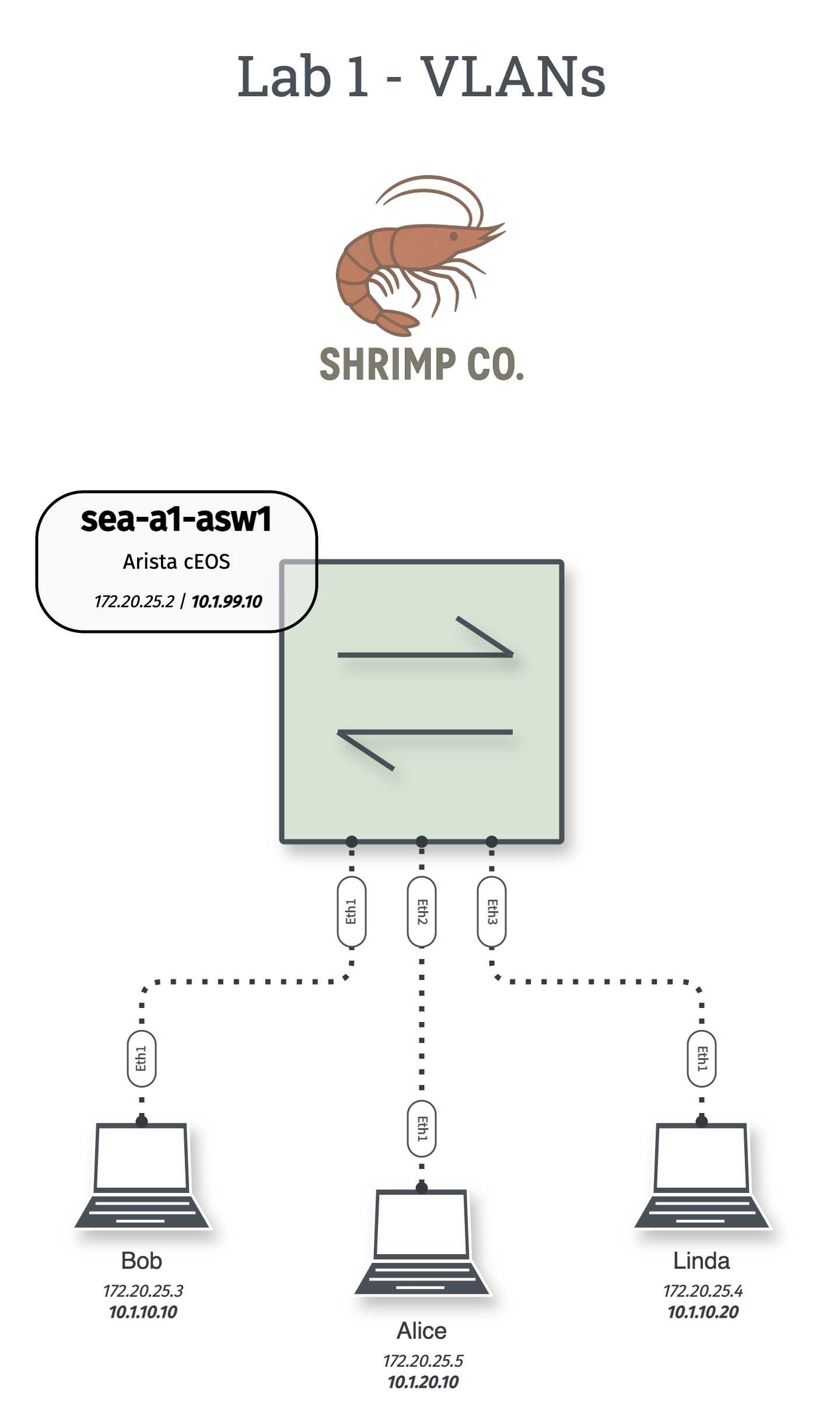
Tip: Individual topology files are available in the diagrams folder on my Github
Login Credentials
Linux Host: labuser/admin
Router/Switch: admin/admin
Configuration Tasks
VLAN Configuration
Create and configure the following VLANs:
- VLAN 10 - Sales
- VLAN 20 - Engineering
- VLAN 99 - IT
Host IP Addresses & VLAN Assignment
Hosts and devices in the diagram have two IP addresses shown. 172.25.20.X is a docker management subnet that's pre-configured and allows you SSH access, while the 10.X.X.X will be configured by you in the lab.
Success Criteria
Primary Goals
- Connectivity Test: Bob and Linda can ping each other (same VLAN)
- Isolation Test: Alice cannot ping Bob or Linda (different VLANs)
Stretch Goals
- Add descriptive port descriptions to all switchports
- Configure VLAN 99 SVI on the switch (
interface Vlan99) with IP10.1.99.10/24 - Take a packet capture of successful pings between Bob & Lind with
tcpdump interface ethernet1 filter icmp
Verification Commands
# Show configured VLANs
show vlan [brief]

# Show interface status, duplex, speed, and more
show interfaces status

# Show MAC address forwarding table
show mac address-table

# Show configured IP interfaces
show ip interface brief
# Show configured IP information
ifconfig
# Send ICMP echo requests
ping 10.1.10.20Confused about syntax? Hitting ? will show you all the available options for the next word in your command sequence. You can even use it after a letter to see which options start with that letter. c? will show all options starting with "c"
Key Concepts
Why VLANs Matter
- Security: Network segmentation isolates traffic
- Broadcast Control: Reduces broadcast domain size
- Organization: Logical grouping of devices
Questions to Explore
- What happens when you send a broadcast in VLAN 10?
- How does the switch learn where each host is located?
- Why does interface VLAN 99 say down/lowerlayerdown in the output of
show interfaces status? - When you took the
tcpdumpwhat parts of the output can you identify?
Linux host tips
- Can't SSH to hosts? Use:
docker exec -it <container-name> bash - Set static IP:
sudo ip addr add 10.1.10.10/24 dev eth1