

Lab 9 - Multiarea OSPF & GRE
Shrimp Co. is opening remote offices in Milwaukee and New Orleans. Implement multi-area OSPF for scalable routing and configure GRE tunnels to connect all locations over the internet.
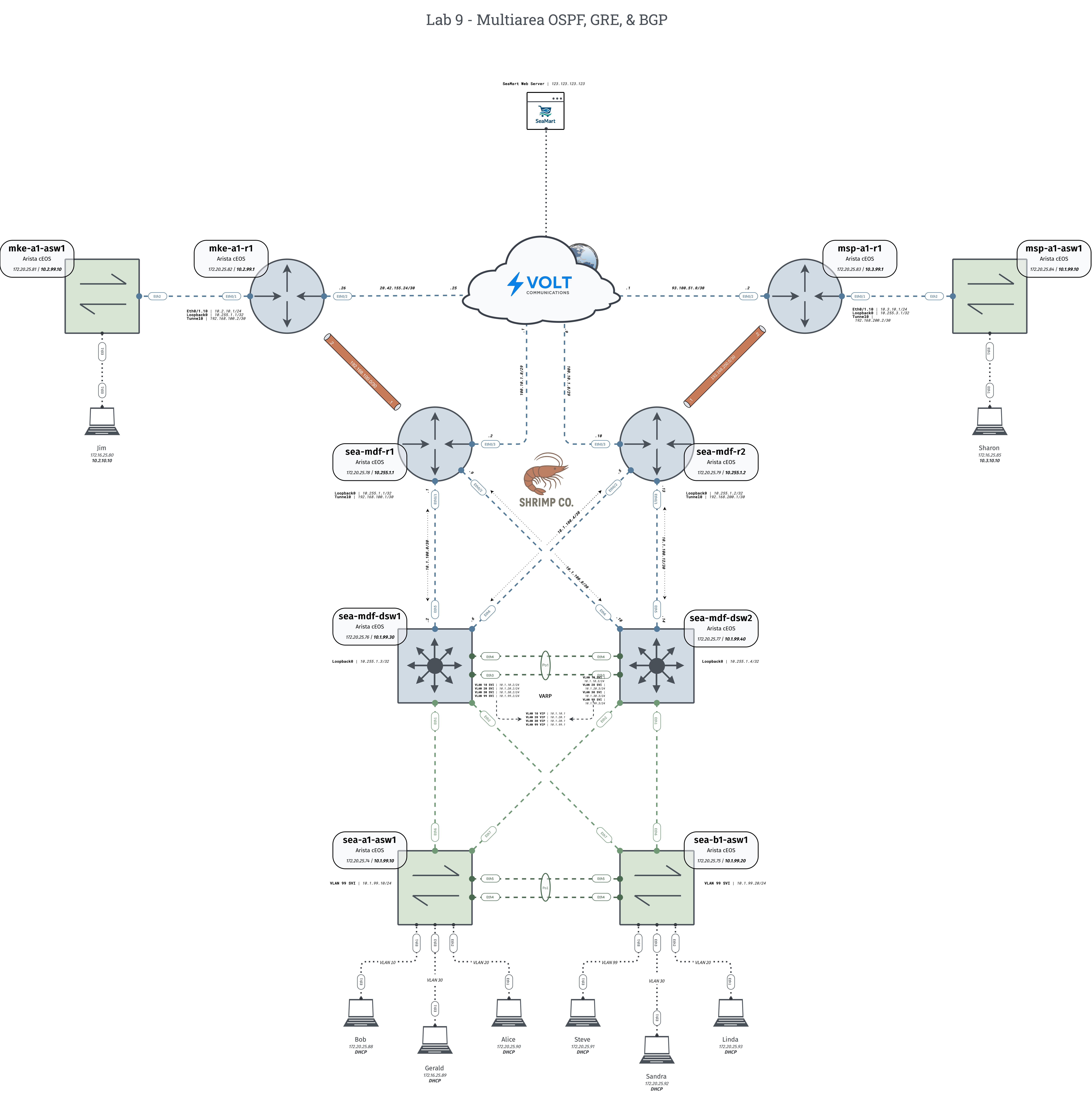
Tip: Individual topology files are available in the diagrams folder on my Github
Configuration Tasks
1. Access Layer Configuration:
Ensure access ports, trunks, VLAN databases, and port-channels are configured to span Layer 2 domain across all access and distribution switches.
- VLAN 10 – Sales
- VLAN 20 – Engineering
- VLAN 30 – Marketing
- VLAN 99 – IT
2. Distribution Layer Configuration:
- Routed Ports & Loopback0
- Configure routed ports and Loopback0 according to diagram
- VLANs, Trunks & Port-channels
- Ensure VLAN databases are matching and VLANs are allowed across all links
- VRRP Configuration
- Configure VIPs according to diagram
- Load balance active gateways using priority.
sea-mdf-dsw1should be active for VLANs 10 and 20,sea-mdf-dsw2should be the active gateway for VLANs 30 and 99. - Implement MD5 authentication
- OSPF
- Configure OSPF process 1 with passive-interface default
- Advertise all host subnets with a single summary network statement.
- Advertise Loopback0
- Form adjacencies on Eth5-6 in Area 0
- Utilize MD5 neighbor authentication
3. Router Configuration:
- Routed Ports & Loopback0
- Configure routed ports, Loopback0, and Tunnel0 according to diagram
- OSPF
- Configure OSPF process 1 with passive-interface default
- Form adjacencies on Eth0/1-2 in Area 0
- Form adjacency on Tunnel0 in Area 1 on
sea-mdf-r1(Requires remote site configuration) - Form adjacency on Tunnel0 in Area 2 on
sea-mdf-r1(Requires remote site configuration) - Originate the default route you receive from your BGP peer
- Advertise Loopback0
- BGP
- Configure BGP peering, refer to ISP provided documentation for details.
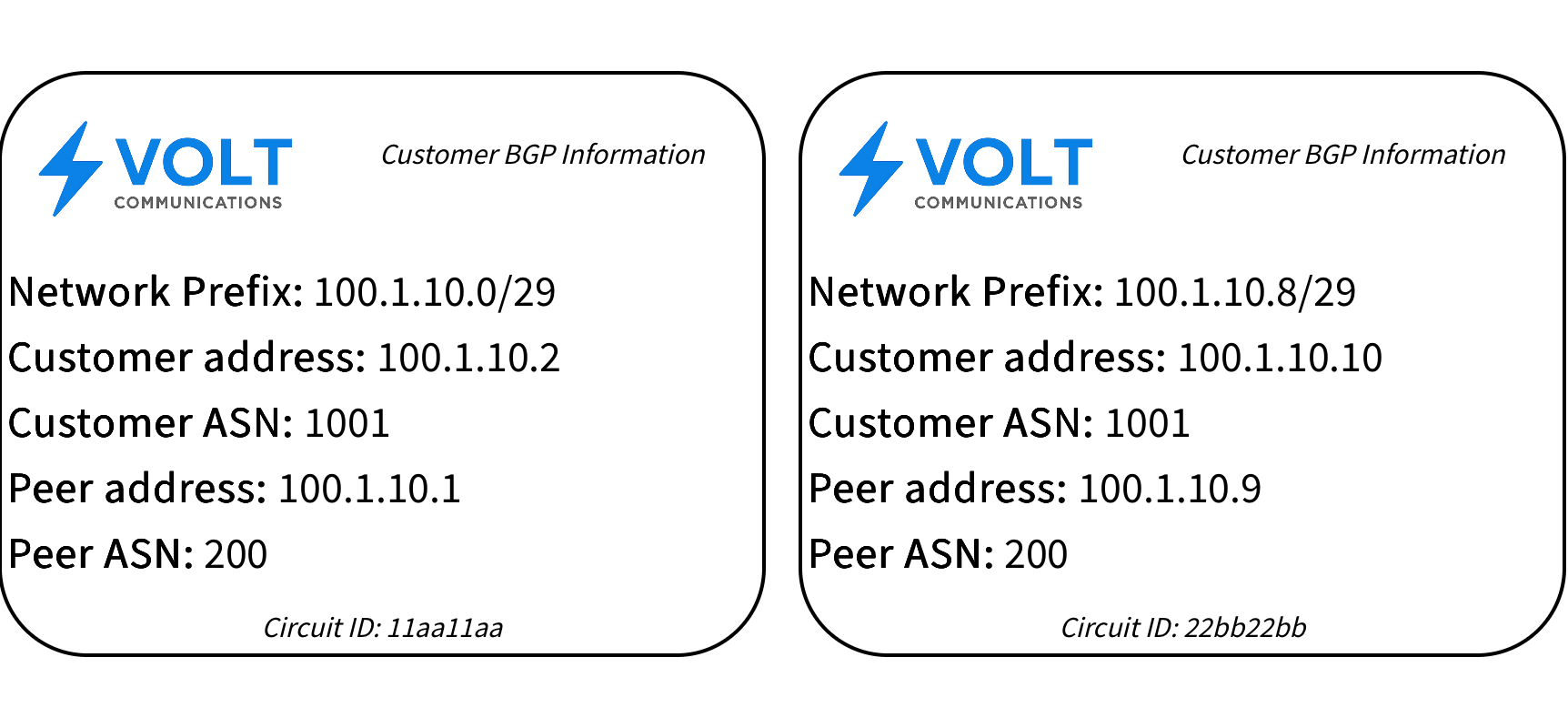
- Configure BGP peering, refer to ISP provided documentation for details.
- NAT
- Configure PAT on both routers, only matching host host subnet traffic.
- DHCP
- Configure DHCP Pools on both routers for all host subnets so that routers cannot provide overlapping IP addresses.
4. Remote Site Configuration:
- Switch
- Ensure VLAN 10 can reach it's gateway interface on the local router.
- Router
- Configure router subinterface and Loopback0 according to diagram
- Configure static default route to public next-hop
- Configure OSPF process 1 with passive-interface default
- Form adjacency on Tunnel0 in Area 1 on
sea-mdf-r1 - Form adjacency on Tunnel0 in Area 2 on
sea-mdf-r1 - Configure static NAT or PAT for local internet egress.
Success Criteria
- Hosts at HQ have ping reachability to remote sites
- Hosts at HQ can curl http://seamart.com
- Pings to the internet fail for Loopbacks but not hosts
- Encrypt WAN traffic on your GRE tunnels using IPsec tunnel protection
- Configure VARP instead of VRRP for your FHRP
- Have Jim & Sharon acquire a DHCP address across the WAN
- Configure EIGRP on your Tunnel interfaces, what additional configuration is needed for your remote sites to learn about networks at HQ and vise versa?
Verification Commands
show ip ospf neighbor
show ip route ospf
show interfaces tunnel0
show ip bgp summary
show ip bgpQuestions to Explore
- What happens to your switchports when MST is configured on one switch and Rapid-PVST is configured on the other?
- What's the smallest possible summary network statement you can use to advertise all host subnets? (No loopbacks)
- Traceroute to Jim from Bob. Why don't you see any public IP addresses in the output despite it crossing that infrastructure?
- Would Jim and Sharon still have internet reachability if you configured Areas 1 & 2 as totally stubby? What would be the fix while maintaining your totally stub areas??
Cisco Press - BGP Fundamentals IP Routing: OSPF Configuration Guide EOS OSPF Guide How to configure GRE Tunnel in CISCO Router How to configure GRE over IPSec in Cisco IOS and Cisco IOS-XE devices